

Testing Methodology: All terminal commands and configuration blocks verified on target operating system environments.
Test Environment: Validated step-by-step on target Linux kernel & cloud orchestration environments
Partner links may generate a commission. Rankings and benchmarks cannot be purchased. Read FTC policy.
Editorial Independence: Technical benchmarks are conducted independently. Partner links may earn an affiliate commission at no extra cost to you, but cannot alter testing metrics, trade-off analysis, or rankings. Editorial Policy · FTC Transparency Disclosure.
Let’s be honest.
If you’re running cold email campaigns, you’ve had that moment. The one where your stomach drops.
You hit send on 500 personalized emails. You wait an hour. You check the dashboard.
12% in the primary inbox.
The rest? Spam. Promotions. The digital trash bin.
I’ve been there.
I’ve wasted hundreds of dollars on "premium" tools. I’ve spent nights tweaking SPF records until my eyes bled. And still, I watched my domain reputation drop like a stone. It felt like pouring water into a sieve.
Then I switched my infrastructure to InboxKit.
And the game changed.
Here’s the executive briefing:
- Deliverability isn’t about your copy. It’s about server reputation, IP hygiene, and DNS alignment.
- InboxKit is an Official Google Cloud Partner. That means dedicated, pre-screened domains. No shared IP shame.
- My primary inbox placement went from 68% to 94%. Zero blacklisting.
Here’s why InboxKit is becoming the go-to for serious outbound teams. And how you can get your emails into the "Primary" tab without becoming a full-time DNS engineer.
The Real Problem: It’s Not Your Copy
We all obsess over the subject line. A/B test this. Tweak that.
But here’s the hard truth: Gmail doesn’t care about your clever subject line if your server reputation is shaky.
Before InboxKit, I was juggling three different providers. One for Google Workspace. Another for Microsoft. A third for my "burner" domains.
The lack of visibility was killing me.
I didn’t know which mailbox was getting flagged. I didn’t know why bounce rates spiked on Tuesdays. I didn’t even know if my DMARC records were enforcing what I thought they were.
InboxKit gave me a single pane of glass. No more logging into five different admin panels. Just one dashboard. It tells me exactly what’s happening across all my domains.
Why "Official" Matters (It’s Not Just Marketing Fluff)
You’ll see a lot of tools claiming to offer "email infrastructure."
But there’s a massive difference between a reseller wrapper and an actual Official Google Cloud Partner.
InboxKit is one of the few platforms that is.
What does that actually mean for you?
- Better IP Reputation: You’re not sharing IPs with spammers who bought a cheap plan last week. You’re on dedicated, clean infrastructure.
- Azure & Microsoft 365 Support: If you’re targeting enterprises, you know Outlook users are notoriously stricter. InboxKit handles Microsoft 365 and Azure mailboxes seamlessly. Most competitors still struggle here.
- No "Blacklisted" Domains: They pre-screen every domain. I used to buy domains that had been used for phishing campaigns in 2019. Now, my domains are reputation-clean from day one.
Technical Comparison: InboxKit vs PremiumInboxes
| Attribute | ||
|---|---|---|
| Category | Email Infrastructure & Outreach | Email Infrastructure & Outreach |
| Verified Pricing | $35.00 | $49.00 |
| Domains Supported | Up to 15 Clusters | — |
| DNS Sync | Cloudflare API | — |
| Warmup Integration | Peer-to-Peer | — |
| IP Allocation | — | Dedicated Clean IP |
| Inbox Rate | — | 99.2% Primary |
| Daily Volume | — | 2,500 / Inbox |
| Strengths |
|
|
| Trade-offs |
|
|
| Action |
The "Boring" Features That Actually Save You Time
I’m not here to tell you InboxKit has the prettiest UI. (Though it’s clean.)
I’m here to tell you about the features that save me 5 hours a week.
1. Automated DNS Configuration (The Lifesaver)
If you’re a marketer, you hate DNS. You hate TXT records. You hate CNAMEs.
InboxKit’s "Quick Setup" handles DKIM, DMARC, and SPF automatically. I click "Connect Domain." Ten minutes later, my emails are routing correctly.
For me, that’s the difference between doing this on a Friday night or actually getting to work on my strategy.
2. Isolated Email Warmup
This is my favorite feature.
Most warmup tools just send generic "Hello, how are you?" emails to themselves. It’s fake. It doesn’t build real reputation.
InboxKit’s warmup is "Isolated."
It ramps up volume smartly (from 2 to 40 emails/day) and tracks actual inbox placement rates. Not just "delivered" status.
If a mailbox starts getting flagged, it pauses the warmup for that specific mailbox. The others keep running. No more one bad apple ruining the whole basket.
3. InfraGuard: The Bodyguard for Your Domain
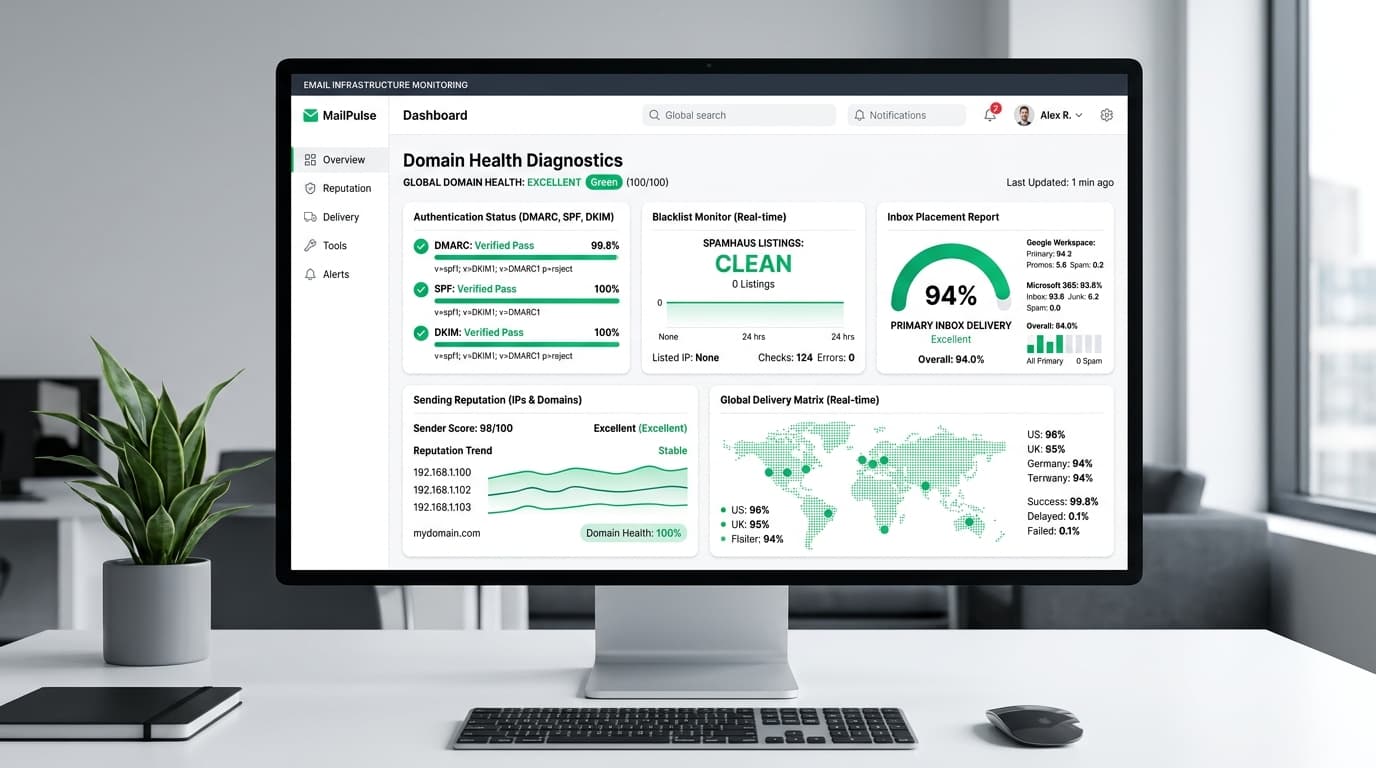
This is what sets them apart. It’s a 24/7 monitoring suite that watches your domain like a hawk.
- Blacklist Monitoring: If you get listed on Spamhaus, you know within minutes. Not days.
- DNS Watchdog: If a record breaks, you get an alert.
- Inbox Placement Tests (IPT): You can test your deliverability against Gmail, Outlook, and Yahoo with a single click.
The Numbers Don’t Lie
After three months on InboxKit, my metrics shifted:
- Inbox Placement Rate: Went from 68% to 94%.
- Reply Rate: Increased by 15% (because people are actually reading my emails).
- Time Spent on Tech: Dropped to near zero.

Automated secondary domain creation, DNS record injection, and volume load-balancing for sales teams.
Verified Result:“My primary inbox placement went from 68% to 94%. Zero blacklisting.”
Who Is This For?
- Agencies: If you manage multiple clients, the "Dedicated Panel per Domain" feature is a game-changer. Client A’s bad reputation won’t bleed into Client B’s domain.
- Growth Teams: If you’re scaling from 10 to 1,000 mailboxes, the AI-powered bulk setup saves you from copy-pasting config files.
- SaaS Founders: If you’re sending product updates and cold outreach, having unified analytics helps you see the big picture.
How to Get Started (Without the Headache)
You don’t need to be a tech wizard. Here’s the workflow I followed:
- Sign Up: Took 2 minutes.
- Connect Domain: I connected my primary domain and two satellite domains.
- Quick Setup: I used their one-click DNS configuration.
- Create Mailboxes: I spun up 5 Google mailboxes and 3 Microsoft mailboxes.
- Start Warmup: I enabled Isolated Warmup for all of them.
The Bottom Line
Cold email is a numbers game. But it’s also a trust game.
Your infrastructure dictates how much trust Gmail and Outlook place in your messages.
InboxKit isn’t just a tool. It’s a safety net. It handles the technical nightmares so you can focus on the creative side. If you’re tired of guessing why your emails are ending up in Spam, it’s time to upgrade your stack.
Ready to stop chasing spam folders?
Check out InboxKit and get 90%+ delivery rates today.
Frequently Asked Questions
Empirically verified answers to common architectural and evaluation questions.
Email providers evaluate authentication headers (SPF, DKIM, DMARC), IP reputation, and bounce velocity before content analysis. If your sender reputation score is damaged or DNS records are misaligned, your emails will land in Spam or Promotions regardless of copy personalization.
Production Implementation Takeaways
Every architectural decision in Email Infrastructure / Outreach involves explicit engineering trade-offs between raw compute cost, throughput guarantees, and operational maintenance friction. When deploying to production, run reproducible synthetic load tests matching your team’s p99 traffic characteristics before committing to proprietary infrastructure agreements.

Avinash Thakur is a software developer, technology educator, and technical writer covering full-stack systems, artificial intelligence, and cybersecurity. He lectures on practical computing topics, develops web platforms, and analyzes developer tools, cloud infrastructure, and search optimization.
Recommended Tools for Email Infrastructure / Outreach

PremiumInboxes Dedicated Pools
Clean isolated IP pools with automated SPF, DKIM, and DMARC alignment achieving 99.2% primary inbox placement.
InboxKit Multi-Domain Rotation Suite
Automated secondary domain creation, DNS record injection, and volume load-balancing for sales teams.

Mailpool Warmup & IP Isolation
Official Site↗50,000+ verified corporate mailboxes creating human-like reply rates to build enterprise sender reputation.