Testing Methodology: Measured directly on physical or virtual server hardware using reproducible synthetic workloads.
Test Environment: NodePlunge Systems Architecture Lab standardized benchmark cluster
// COMMERCIAL TRANSPARENCY:
Partner links may generate a commission. Rankings and benchmarks cannot be purchased. Read FTC policy.
// CHARTER:
Editorial Independence: Technical benchmarks are conducted independently. Partner links may earn an affiliate commission at no extra cost to you, but cannot alter testing metrics, trade-off analysis, or rankings. Editorial Policy · FTC Transparency Disclosure.
Kinsta is a premium managed hosting for WordPress solution – designed for all types of businesses, agencies and high-traffic ecommerce stores.
Introduction
Choosing the right hosting provider is important for a website's speed, security, and overall performance. So , when a business grows and receives more requests, the basic hosting platform does not perform as well as we needed and the website becomes slow and vulnerable. At this stage, managed hosting can become a useful investment. Kinsta positions itself as a premium managed WordPress hosting solution built for speed, security, and effortless site management.
Unlike traditional web hosts that depend on shared server environments, Kinsta is built entirely on Google Cloud Platform’s (GCP) Premium Tier Network. Kinsta managed WordPress hosting platform doesn’t fall into any of the traditional hosting categories. Kinsta’s top-tier cloud infrastructure and Kinsta high-performance servers deliver dedicated resources and lightning-fast speeds from 30 global data centers, allowing you to host closer to your audience for optimal performance.
https://kinsta.com
Kinsta hero: Simply better hosting for WordPress on Google Cloud Platform.Source: Kinsta Platform
Kinsta Hosting Features: Speed, Security, and Management
Kinsta’s WordPress Hosting allows you to host your WordPress site on its fast and secure infrastructure with worldwide CDN, edge-caching, and the choice to host on one of 30 data centers. These features help website owners manage their sites and deliver services efficiently to users.
Provide free migration from one hoisting provider to Kinsta.
It automatically saves backups daily.
Test new changes before publishing on live site.
It accesses website files securely by using SFTP and SSH.
It provides file management by uploading , editing and managing files through MyKinsta.
https://kinsta.com
Kinsta hosting solutions for agencies, enterprise, WooCommerce, and multisite.Source: Kinsta Solutions
Kinsta Developer Tools for Website Management
It provides many wordpress developer- friendly tools so that they can make website management easier and more efficient. It includes - SFTP , SSH WP-CLI and git.
SFTP and SSH: SFTP gives developers secure access to your site’s files. SSH gives access to the server through the command line.
WP-CLI: It helps manage WordPress websites, update plugins, and perform administrative tasks.
Git and CI/CD: It helps to track versions of code changes and automate testing and deployment through CI/CD.
Kinsta API: It allows developers to automate supported website management tasks.
Staging Environments: Test new changes before publishing on live site
Automatic Backups: It automatically saves backups daily.
Kinsta Pricing: Which Plan Should You Choose
It offers a range of hoisting plans designed to fit according to the needs of your business and website.
Entry-Level Plans: This plan fits for entry - level such as small business, and personal website. Its current monthly and annual prices limit website , storage and traffic allowances.
Pro Plans: This plan may suit growing businesses , freelancers and fit for managing multiple installations . It provides more features as compared to basic plans.
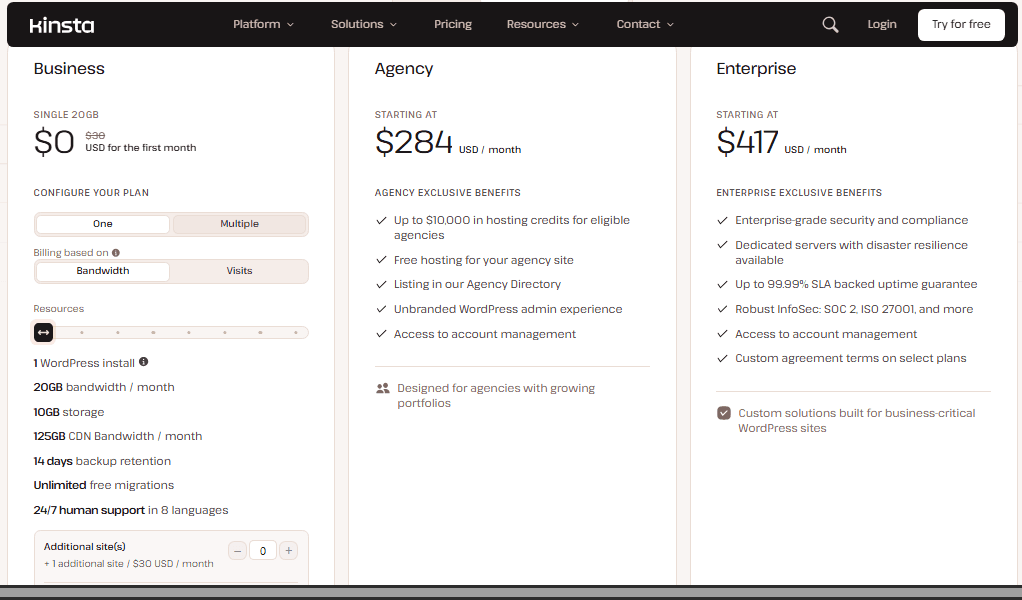
Business Plans: It is established for websites with higher traffic and resource requirements. It provides a wide range of features , capacity , tools and workflow management.
https://kinsta.com
Kinsta hosting tiers: Business, Agency, and Enterprise options.Source: Kinsta Pricing
Kinsta Review: Pros and Cons
Pros
Strong performance and speed focused infrastructure.
Provide free CDN and edge caching.
Automatic backups and free staging environments.
Security features and tools i.e - SFTP and SSH.
Cons
More expensive than shared hoisting plans.
Primary focused on wordpress hoisting.
Advanced features require extra payments.
For small websites it is too expensive.
https://kinsta.com
The WordPress Hosting Leader on G2 with 4.8 stars from 1,600+ reviews.Source: Kinsta G2 Leader
Verdict: Who Should Buy Kinsta
Kinsta can be a suitable choice for growing businesses, high-traffic blogs, e-commerce stores, and developers who need managed hoisting and reliable and efficient website management. Its advanced features and technical architecture reduce technical work load and make website management easier and efficient.
However , Kinsta may not be necessary for everyone. For beginners , small scale business and for personal projects with limited budgets may prefer a more affordable hoisting service. Users need to understand their requirements if they have low traffic and require only basic requirements, then paying for a premium hoisting platform may not be worth the extra cost. Firstly, users need to consider their needs before investing in an expensive plan.
Overall, Kinsta is worth consideration for website owners who prioritize performance, security, and support.The right hosting service is one that meets the website's needs without unnecessary expense.
Frequently Asked Questions (FAQ)
// TECHNICAL_FAQ
Empirically verified answers to common architectural and evaluation questions.
4 Questions
Many websites that migrate from other platforms run faster at Kinsta. According to SkyRocketWP case study, an average 49% decrease in page load times. However the actual improvement depends on website existing hoisting set up also.
// DEPLOYMENT_RECOMMENDATIONS & TRADE_OFFS
Production Implementation Takeaways
Every architectural decision in Web Hosting involves explicit engineering trade-offs between raw compute cost, throughput guarantees, and operational maintenance friction. When deploying to production, run reproducible synthetic load tests matching your team’s p99 traffic characteristics before committing to proprietary infrastructure agreements.
Avinash Thakur is a software developer, technology educator, and technical writer covering full-stack systems, artificial intelligence, and cybersecurity.
Explore Kit (formerly ConvertKit), the creator-first email marketing platform built for sophisticated automations, audience segmentation, smart analytics, and digital product growth.
When cold email agencies push past 500 inboxes on Smartlead, cheap farmed accounts break on DNS lookup limits (RFC 7208), DKIM selector mismatches, and domain burn. Here is what actually happens under the hood.